 Simple
ESP32 OTA releases from GitHub Actions with Arduino CLI
Build ESP32 firmware with Arduino CLI in GitHub Actions, then sign, upload and deploy it to SimpleOTA in one step on every merge to main.
Manual firmware releases work fine until they don’t.
You compile on whichever laptop has the right core version pinned. You remember to bump the version string most of the time. The signing key lives in a folder you assume is backed up. That holds together while you are the only person shipping, and it stops holding together shortly after that.
So: every merge to main becomes a signed, verifiable release. Compiled with
Arduino CLI, signed with your Ed25519 key, uploaded to SimpleOTA, offered to
devices by a deployment. Nothing runs on your machine.
The signing and uploading is one step, because there is now a first-party action for it. The end of the post shows the openssl and curl underneath, for anyone on GitLab or who would rather not run someone else’s action in a release pipeline.
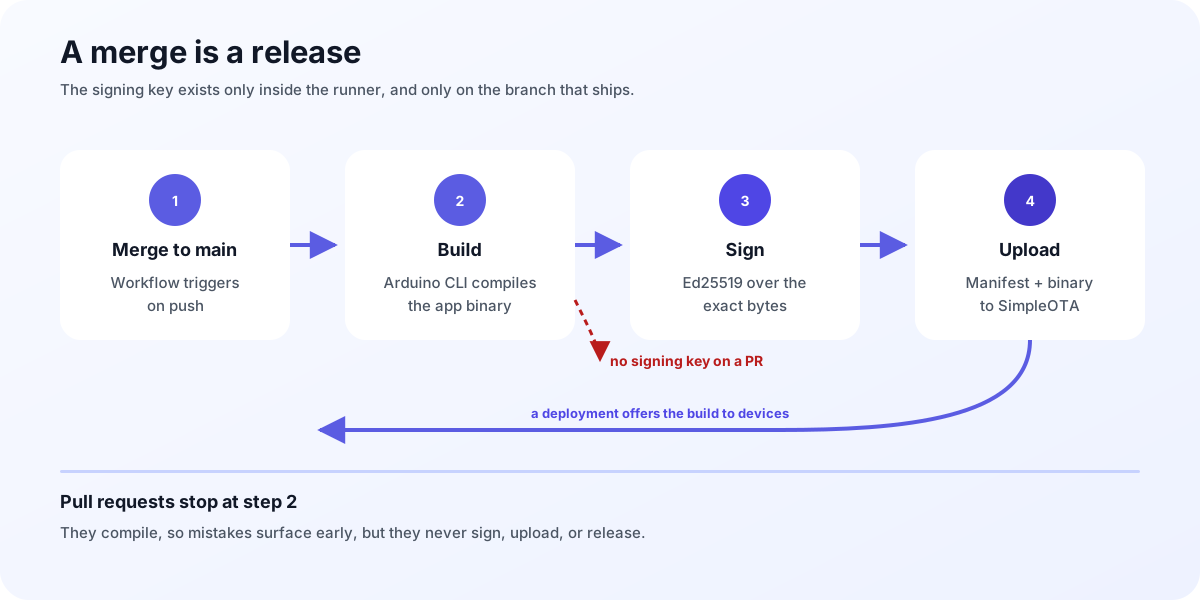 The private key only ever exists inside the CI runner, and only on the branch
that ships.
The private key only ever exists inside the CI runner, and only on the branch
that ships.
What you will build
A single workflow file, about forty lines, that builds on every push and pull
request but only signs, uploads and releases on a merge to main.
Jump to: version · build · secrets · sign and ship · the whole file · troubleshooting
What you need
- An Arduino sketch for an ESP32 that already builds locally.
- A SimpleOTA project with an API-scoped project token.
- A signing key pair, if you want signed releases. Generate one on the project’s signing keys page and keep the private half.
- A GitHub repository with Actions enabled (it’s free).
Signing is optional but recommended, and this workflow is easier to set up once with signing than to retrofit later. If you are new to it, read Signed firmware, verified on the device first for the threat model.
1. Compute a version
SimpleOTA allocates the build number itself, and that is what determines
update ordering. What you supply is the human-readable version_label, so the
scheme only has to be meaningful to you. A date-and-run-number scheme is hard to
get wrong, because it is monotonic without any state:
      - name: Compute version (YYYY.WW.BUILD)
        id: version
        run: |
          YEAR=$(date -u +%Y)
          WEEK=$(date -u +%-V)
          BUILD=${{ github.run_number }}
          VERSION="${YEAR}.${WEEK}.${BUILD}"
          echo "version=$VERSION" >> "$GITHUB_OUTPUT"
          echo "### Firmware version: \`$VERSION\`" >> "$GITHUB_STEP_SUMMARY"
That last line puts the version on the workflow run page. Small thing, but it saves you opening three runs to work out which one shipped what.
Stamp it into the firmware so a device can report the label it is actually running:
      - name: Stamp version into version.h
        run: |
          sed -i 's/#define FIRMWARE_VERSION "[^"]*"/#define FIRMWARE_VERSION "${{ steps.version.outputs.version }}"/' src/version.h
2. Build with Arduino CLI
Arduino CLI is the same toolchain as the IDE without the IDE, so a sketch that compiles on your desk compiles here:
      - name: Install Arduino CLI
        uses: arduino/setup-arduino-cli@v2

      - name: Install ESP32 core
        run: |
          arduino-cli core update-index
          arduino-cli core install esp32:esp32

      - name: Install libraries
        run: |
          arduino-cli lib install "SimpleOTAClient"
          arduino-cli lib install "ArduinoJson"

      - name: Compile firmware
        run: |
          arduino-cli compile \
            -b esp32:esp32:esp32:PartitionScheme=min_spiffs \
            --build-path ./build \
            --warnings default \
            .
Two things here will bite you if you skip them.
The partition scheme is part of your release contract. min_spiffs gives
two app slots, which OTA requires. If you build with a single-app layout the
firmware will compile happily and then fail to update on the device, because
there is no inactive slot to write into.
The artifact you want is build/my-firmware.ino.bin, named after your sketch. Arduino CLI also produces
.ino.merged.bin, .ino.bootloader.bin, and .ino.partitions.bin. The merged
image contains the bootloader and partition table and is meant for a factory
flash over USB, not an OTA slot. Uploading it is the most common cause of
update_begin_failed, because it is far larger than a single app partition.
Pin the core version once you have a release people depend on
(arduino-cli core install esp32:[email protected]). Otherwise a core upgrade lands
in the middle of an unrelated week and changes a binary you expected to be
byte-identical to the last one.
3. Keep credentials out of the repo
Firmware needs Wi-Fi credentials, maybe an MQTT password, an OTA token. None of that belongs in git.
Keep a secrets.h.example in the repo, gitignore the real secrets.h, and let
CI write it at build time from GitHub Secrets.
      - name: Generate secrets.h from GitHub Secrets
        env:
          SIMPLEOTA_TOKEN: ${{ secrets.SIMPLEOTA_TOKEN }}
          MQTT_PASS: ${{ secrets.MQTT_PASS }}
        run: bash generate_secrets.sh
Where generate_secrets.sh is a here-document that writes the header:
#!/usr/bin/env bash
set -euo pipefail
cat > src/secrets.h <<HEADER
#pragma once
#define SIMPLEOTA_TOKEN "${SIMPLEOTA_TOKEN}"
#define MQTT_PASS "${MQTT_PASS}"
HEADER
The file exists only inside the runner, and the runner is destroyed with the job.
One trap here: the device token you compile into firmware is not the token this workflow uploads with. The firmware carries a device or project token scoped to OTA polling. The upload needs an API-scoped project token. Mixing them up produces a confusing 403 at exactly the wrong moment.
4. Sign and ship
This is the part that used to be forty lines of openssl and curl. It is now one step:
      - name: Sign, upload and deploy
        if: github.event_name == 'push' && github.ref == 'refs/heads/main'
        uses: xanderwasserman/simpleOTA-actions@v1
        with:
          api-token:     ${{ secrets.SIMPLEOTA_API_TOKEN }}
          project-id:    ${{ vars.SIMPLEOTA_PROJECT_ID }}
          binary:        build/my-firmware.ino.bin
          version-label: ${{ steps.version.outputs.version }}
          chip-family:   esp32
          board-id:      esp32-devkitc
          signing-key:   ${{ secrets.SIMPLEOTA_SIGNING_KEY }}
          key-id:        prod-2026
The action signs the binary with your Ed25519 key, uploads it, and starts a
deployment, so devices on the channel are offered the build. Drop signing-key
and key-id and it uploads unsigned instead.
Your project id is on the project page in the dashboard, next to the name, with
a copy button. Paste it into a repository Variable called
SIMPLEOTA_PROJECT_ID.
Note which store each value comes from. The token and the signing key are Secrets; the project id is a Variable. GitHub keeps those in two separate places, and reading one as the other gives you an empty string. The action checks for that specifically and tells you which input was empty, which is worth knowing because the underlying failure is otherwise a bare HTTP error.
If you would rather upload without shipping, so a person approves the rollout,
use simpleOTA-actions/upload@v1 instead. It outputs artifact-id, which you
pass to simpleOTA-actions/deploy@v1 from a job gated behind a GitHub
Environment.
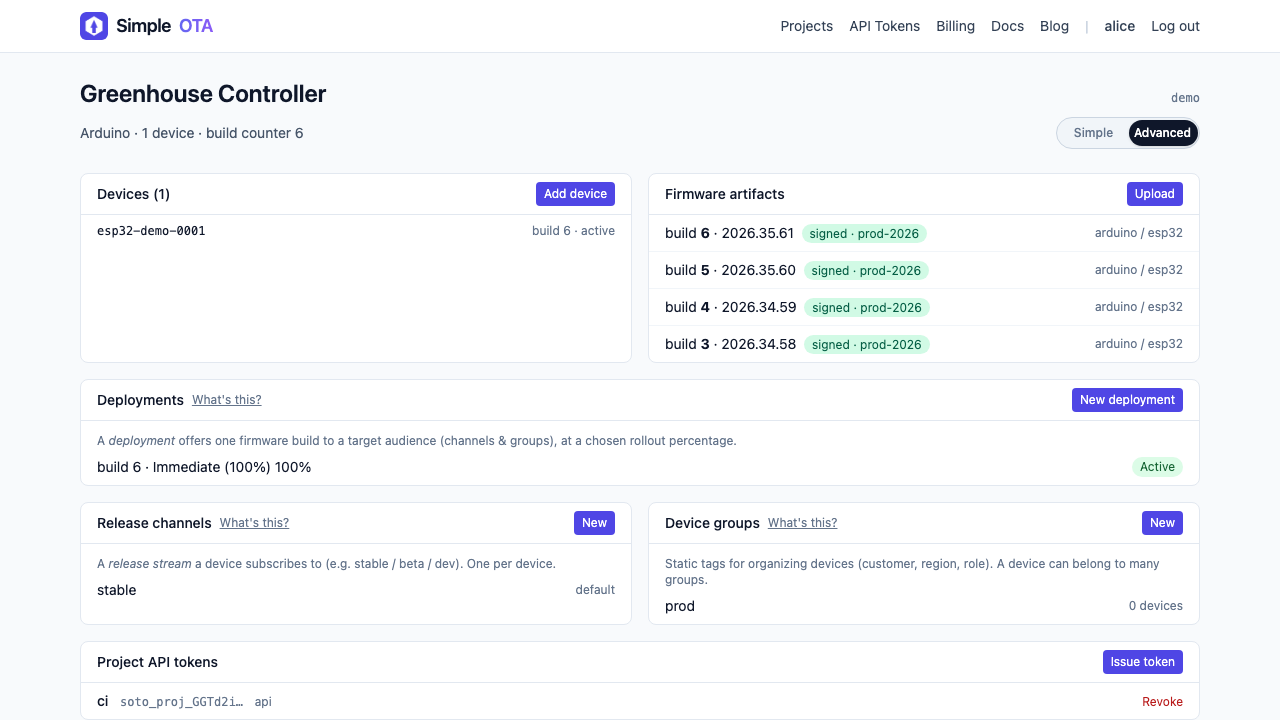 Four merges, four signed builds. The build number on the left is allocated by
SimpleOTA; the label next to it is the one your workflow computed.
Four merges, four signed builds. The build number on the left is allocated by
SimpleOTA; the label next to it is the one your workflow computed.
5. Guard the release path
Notice that every step from signing onward carries the same condition:
if: github.event_name == 'push' && github.ref == 'refs/heads/main'Pull requests and manual runs still build, so you find compile errors early, but they never sign, never upload, and never create a release. Without this, opening a pull request would ship firmware to your fleet, which is a bad afternoon.
The complete workflow
name: Build and release (ESP32)

on:
  workflow_dispatch:
  push:
    branches: [ main ]
  pull_request:
    branches: [ main ]

permissions:
  contents: write   # create tags and releases

jobs:
  build:
    runs-on: ubuntu-latest
    steps:
      - uses: actions/checkout@v4

      - name: Compute version (YYYY.WW.BUILD)
        id: version
        run: |
          VERSION="$(date -u +%Y).$(date -u +%-V).${{ github.run_number }}"
          echo "version=$VERSION" >> "$GITHUB_OUTPUT"
          echo "### Firmware version: \`$VERSION\`" >> "$GITHUB_STEP_SUMMARY"

      - name: Stamp version into version.h
        run: |
          sed -i 's/#define FIRMWARE_VERSION "[^"]*"/#define FIRMWARE_VERSION "${{ steps.version.outputs.version }}"/' src/version.h

      - uses: arduino/setup-arduino-cli@v2

      - name: Install core and libraries
        run: |
          arduino-cli core update-index
          arduino-cli core install esp32:esp32
          arduino-cli lib install "SimpleOTAClient"

      - name: Generate secrets.h
        env:
          SIMPLEOTA_TOKEN: ${{ secrets.SIMPLEOTA_TOKEN }}
        run: bash generate_secrets.sh

      - name: Compile firmware
        run: |
          arduino-cli compile -b esp32:esp32:esp32:PartitionScheme=min_spiffs \
            --build-path ./build --warnings default .

      - name: Upload build artifact
        uses: actions/upload-artifact@v4
        with:
          name: firmware-${{ steps.version.outputs.version }}
          path: build/my-firmware.ino.bin
          retention-days: 30

      - name: Sign, upload and deploy
        if: github.event_name == 'push' && github.ref == 'refs/heads/main'
        uses: xanderwasserman/simpleOTA-actions@v1
        with:
          api-token:     ${{ secrets.SIMPLEOTA_API_TOKEN }}
          project-id:    ${{ vars.SIMPLEOTA_PROJECT_ID }}
          binary:        build/my-firmware.ino.bin
          version-label: ${{ steps.version.outputs.version }}
          chip-family:   esp32
          board-id:      esp32-devkitc
          signing-key:   ${{ secrets.SIMPLEOTA_SIGNING_KEY }}
          key-id:        prod-2026

      - name: Create GitHub Release
        if: github.event_name == 'push' && github.ref == 'refs/heads/main'
        uses: softprops/action-gh-release@v2
        with:
          tag_name: v${{ steps.version.outputs.version }}
          generate_release_notes: true
Uploading an artifact does not ship it. The build becomes available, and a deployment decides who gets it. In Simple mode an upload creates an immediate 100 percent deployment; in Advanced mode you create the deployment yourself and can start with a small canary.
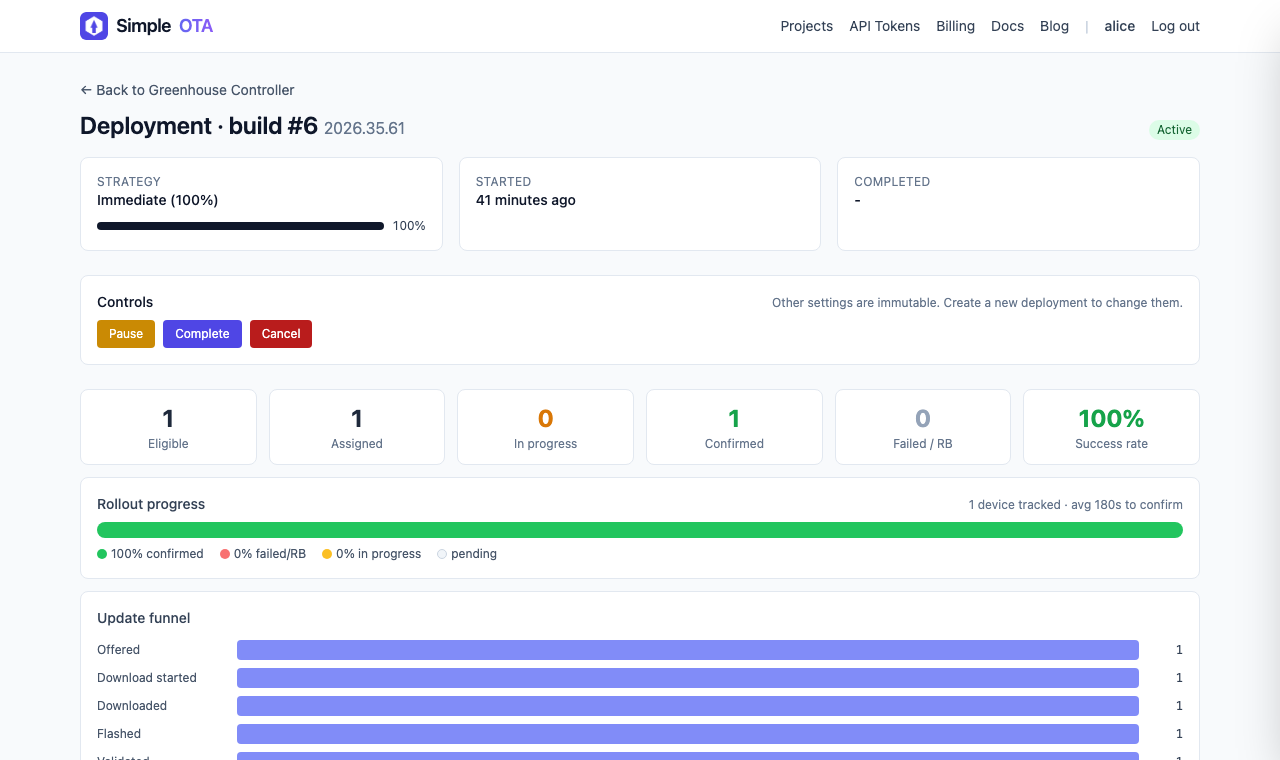 The other end of the pipeline. The funnel is worth watching on the first few
automated releases, because a build that installs but never confirms shows up
here long before anyone reports it.
The other end of the pipeline. The funnel is worth watching on the first few
automated releases, because a build that installs but never confirms shows up
here long before anyone reports it.
What the action actually does
Worth knowing, both because you may be on GitLab or Jenkins, and because a release pipeline is a bad place for magic.
Signing is Ed25519 over the exact bytes of the application image. The private key is written to a temp file, used, and deleted in the same step:
      - name: Sign firmware for SimpleOTA
        if: github.event_name == 'push' && github.ref == 'refs/heads/main'
        env:
          SIMPLEOTA_SIGNING_KEY: ${{ secrets.SIMPLEOTA_SIGNING_KEY }}
        run: |
          if [ -z "$SIMPLEOTA_SIGNING_KEY" ]; then
            echo "::error::SIMPLEOTA_SIGNING_KEY secret (private PEM) is not set"; exit 1
          fi
          umask 077
          printf '%s' "$SIMPLEOTA_SIGNING_KEY" > "$RUNNER_TEMP/signing_private.pem"
          openssl pkeyutl -sign -inkey "$RUNNER_TEMP/signing_private.pem" -rawin \
            -in build/my-firmware.ino.bin | openssl base64 -A > "$RUNNER_TEMP/fw.sig.b64"
          rm -f "$RUNNER_TEMP/signing_private.pem"
          echo "SIMPLEOTA_SIGNATURE_B64=$(cat "$RUNNER_TEMP/fw.sig.b64")" >> "$GITHUB_ENV"
openssl pkeyutl -sign -rawin is the Ed25519 path and needs OpenSSL 3.x, which
GitHub-hosted runners have. Ed25519 signs the message itself rather than a
digest, which is why there is no -digest argument and no separate hash step.
The upload is a multipart POST with a JSON manifest alongside the binary:
      - name: Upload firmware to SimpleOTA
        if: github.event_name == 'push' && github.ref == 'refs/heads/main'
        env:
          SIMPLEOTA_BASE_URL:   ${{ vars.SIMPLEOTA_BASE_URL || 'https://simpleota.com' }}
          SIMPLEOTA_PROJECT_ID: ${{ vars.SIMPLEOTA_PROJECT_ID }}
          SIMPLEOTA_KEY_ID:     ${{ vars.SIMPLEOTA_KEY_ID }}
          SIMPLEOTA_API_TOKEN:  ${{ secrets.SIMPLEOTA_API_TOKEN }}
          VERSION:              ${{ steps.version.outputs.version }}
        run: |
          set -euo pipefail
          MANIFEST="{\"framework\":\"arduino\",\"version_label\":\"${VERSION}\",\"chip_family\":\"esp32\",\"board_id\":\"esp32-devkitc\",\"partition_profile\":\"min_spiffs\",\"security_mode\":\"signed\",\"signing_metadata\":{\"key_id\":\"${SIMPLEOTA_KEY_ID}\",\"algorithm\":\"ed25519\",\"signature\":\"${SIMPLEOTA_SIGNATURE_B64}\"}}"
          curl --fail-with-body \
            -X POST "${SIMPLEOTA_BASE_URL}/api/v1/projects/${SIMPLEOTA_PROJECT_ID}/artifacts/" \
            -H "Authorization: Bearer ${SIMPLEOTA_API_TOKEN}" \
            -F "manifest=${MANIFEST}" \
            -F "binary=@build/my-firmware.ino.bin"
--fail-with-body is not decoration. Plain curl exits 0 on an HTTP error, so
without it a rejected upload gives you a green tick and no firmware.
The action builds that manifest with jq rather than string concatenation,
which matters the first time your release notes contain a quote or a newline.
Troubleshooting
The upload returns 403, but the token is correct
This one took me embarrassingly long to find, because I kept re-checking the token.
If your domain sits behind a bot-mitigation layer, a scripted POST from a CI
runner looks exactly like the thing that layer exists to block. It never reaches
the application, so the token was never the problem. Browsers pass the
challenge; curl does not. That is why the endpoint works perfectly when you
test it by hand and 403s from CI.
Scope the protection so /api/ paths are excluded rather than switching it off
everywhere.
The workflow says a variable is empty, but you definitely set it
GitHub Actions has two separate stores, Secrets and Variables, and
${{ secrets.X }} and ${{ vars.X }} do not read the same one. Put
SIMPLEOTA_PROJECT_ID in the Secrets tab, reference it as
vars.SIMPLEOTA_PROJECT_ID, and you get an empty string plus an error message
that never mentions the actual reason.
I have made this mistake. Tokens and keys go in Secrets, ids and hostnames go in Variables.
Devices never receive the update
Compare the manifest fields against a device row in the dashboard.
chip_family, board_id, hardware_revision, and partition_profile are
matched exactly, and a mismatch in any of them means the device is not eligible.
The device reports no_compatible_build rather than failing loudly.
The device reports signature_invalid
The signature covers the exact bytes of the file you uploaded. Rebuild, re-stamp, or even regenerate the binary between signing and uploading and it no longer matches. Sign, then upload, with nothing in between.
If that checks out, compare the manifest’s key_id against the key the device
has pinned. A device pinned to prod-2026 rejecting a build signed with a
different key is not a bug, it is the feature working.
Where to go next
Every merge to main now produces a signed, versioned release, and the private
key never exists anywhere except inside a runner that gets destroyed afterwards.
Worth doing next, roughly in order of value:
- Move from Simple mode to a staged rollout, so a bad build reaches a canary group instead of the whole fleet.
- Set an auto-pause threshold on rollbacks so the deployment stops itself.
- Pin the ESP32 core version so builds are reproducible.
- Add a job that fails the build if the binary exceeds one app partition.
The upload API is documented in the developer API guide, and the signing contract in the signed firmware guide.
Create a free SimpleOTA project and let the next merge do the release for you.