 Simple
SimpleOTA client libraries 1.0 for Arduino and ESP-IDF
The Arduino and ESP-IDF client libraries hit 1.0 and now share one core. Here is what changed, what you need to update, and how your devices get there over the air.
Both SimpleOTA client libraries just hit 1.0. SimpleOTAClient 1.0.0 for Arduino and simpleota 1.0.0 for ESP-IDF now run on the same update core behind the same simpleota.h. Whichever framework you use, you get the same API and the same behaviour, so if you’re starting new firmware, start here.
The short version for existing users: if your Arduino sketch creates a SimpleOTAClient object, you’ll need to change a few lines before it builds. Your devices in the field are fine, though. Anything running Arduino 0.6.0 or earlier, or ESP-IDF 0.2.x, can take the 1.0 image over the air.
Getting it
On Arduino, grab SimpleOTAClient 1.0.0 from the Library Manager, or use
the PlatformIO package xanderwasserman/SimpleOTAClient. On ESP-IDF, add the
component wassie-dev/simpleota:
idf.py add-dependency "wassie-dev/simpleota^1.0.0"Heads up if you’re on ESP-IDF 0.2.x: your project depends on
xanderwasserman/simpleota, and that name stays on 0.2.x for good. Swap it for
wassie-dev/simpleota in your idf_component.yml to get 1.0.
Either way, you include simpleota.h (<simpleota.h> on Arduino,
"simpleota.h" on ESP-IDF). Both libraries are tagged v1.0.0 on GitHub.
Upgrading from 0.x
The good news first: devices on Arduino 0.6.0 or earlier, or on ESP-IDF 0.2.x,
can update to 1.0 over the air. 1.0 keeps the NVS keys those releases already
write and adds one new key, sota_image, which older releases simply ignore.
If the 1.0 trial fails, the device boots back into the old image just like it
would for any other update.
On Arduino, 1.0 is a breaking change. The SimpleOTAClient class is replaced
by the C API, so you fill in a simpleota_config_t and call
simpleota_init(). If you used begin() on 0.6, its arguments map across like
this:
intervalis nowcfg.check_interval_s.onResultis nowcfg.event_cb.isConnectedis nowcfg.is_connected, and the callback takes avoid *.initialDelayMsis nowcfg.initial_delay_ms, and you callsimpleota_start()to run the task.
You can delete any calls to report(), because the library posts every status
itself.
security_mode is an enum on both clients now, simpleota_security_t. Set it
to SIMPLEOTA_SECURITY_BASIC or SIMPLEOTA_SECURITY_SIGNED, or leave it at
zero to report none. ESP-IDF code that already uses those two names compiles
as is. SIMPLEOTA_SECURITY_TOKEN and string values won’t compile, and the
platform treats a device that reports token as reporting none.
One more thing if you use signed firmware: SIMPLEOTA_SECURITY_SIGNED needs at
least one key in cfg.signing_keys. Without one, simpleota_init() returns
ESP_ERR_INVALID_ARG on both clients. That way a device in signed mode always
has a pinned key to check signatures against.
Downgrades and rollbacks
Build numbers only go up, and 1.0 holds devices to that. A device won’t install a build at or below the one it’s running, so you can’t fix a bad release by pointing the deployment back at an older build. Roll forward instead:
- Pause the deployment that’s offering the bad build.
- Upload the known-good binary again. SimpleOTA gives it the next build number, so 13 if 12 was the last one.
- Deploy that new build.
Pausing deployments walks through it in more detail.
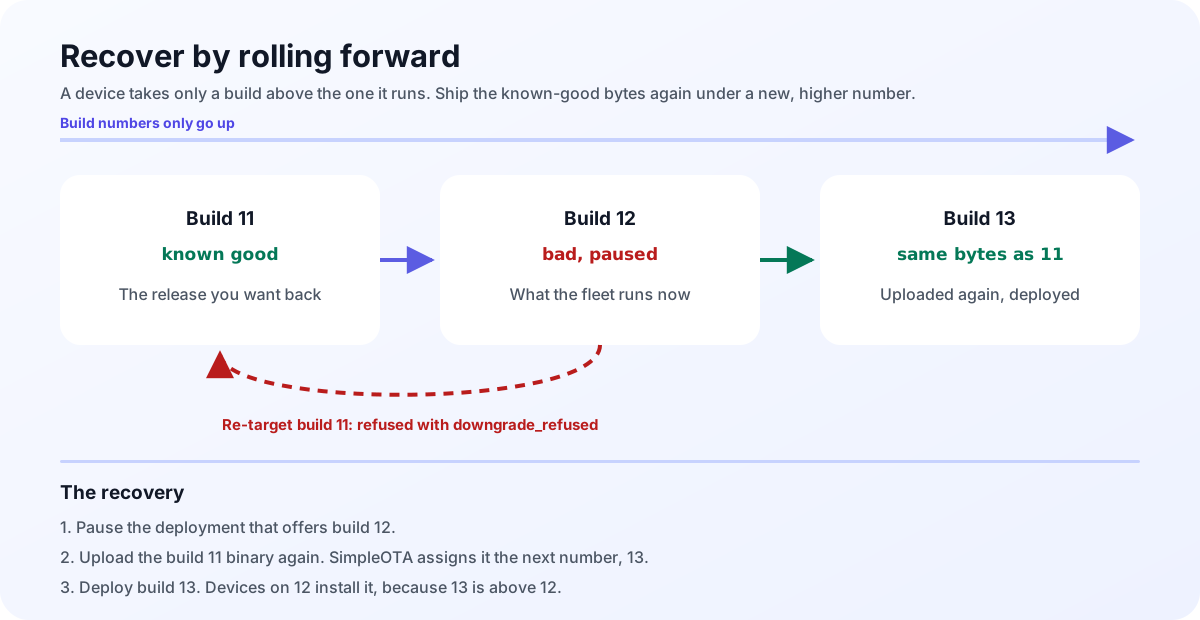 Same bytes as an older release, but a higher build number.
If you poll, simpleota_check() reports the offer as usual. simpleota_apply()
then sees that build_number isn’t above the running build, posts failed
with reason downgrade_refused to /status/, and returns
SIMPLEOTA_DOWNGRADE. There’s no override in the public API. The device posts
that status once per boot, so applying the same offer again in the same boot
just returns SIMPLEOTA_DOWNGRADE quietly.
#include <esp_log.h>

bool update = false;
if (simpleota_check(&update) == ESP_OK && update) {
  if (simpleota_apply() == SIMPLEOTA_DOWNGRADE) {
    ESP_LOGW("simpleota", "offered build is not above the running one");
  }
}
Rolling back a bad update is a different thing, and it’s automatic. When a newer build is flashed, the previous image stays on flash until the new one is confirmed. If the confirm timeout runs out, or the new image resets for any reason before it’s confirmed (a crash, a watchdog, a brownout, a power cut, a restart or a wake from deep sleep), the device goes back to the previous image. So on both clients, confirm before you restart or sleep on purpose.
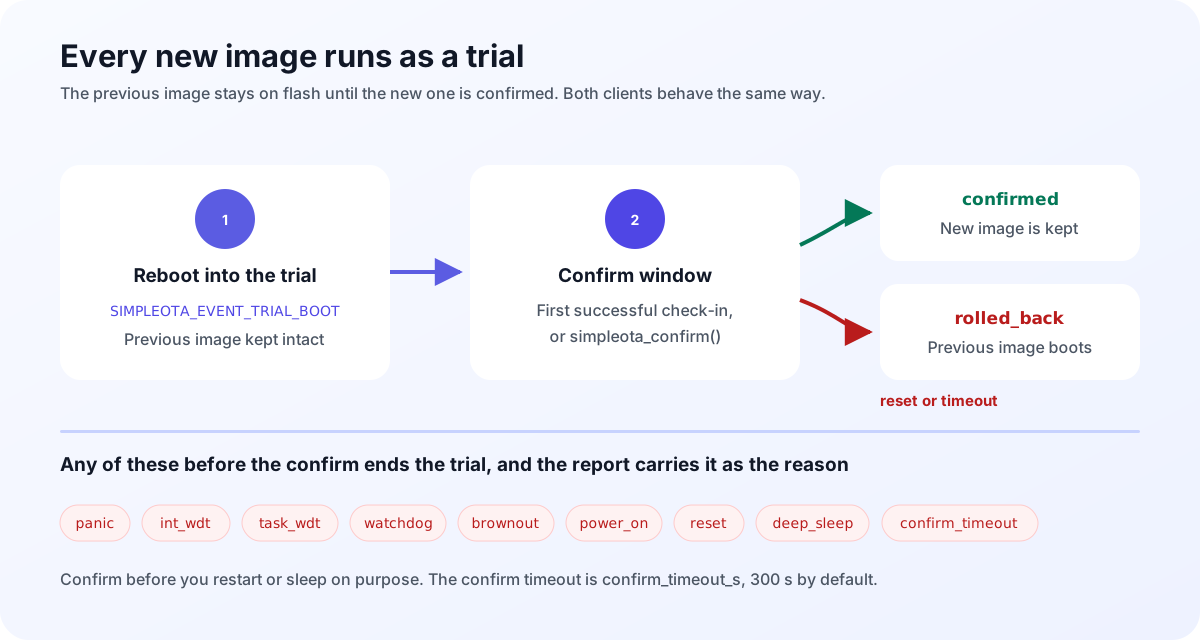 The
The rolled_back report tells you what ended the trial.
On Arduino, every update in 1.0 runs as a trial, so setRollbackEnabled() is
gone. On ESP-IDF, turning on CONFIG_BOOTLOADER_APP_ROLLBACK_ENABLE also
catches an image that crashes before simpleota_init() even runs. Keep in mind
that this setting lives in the bootloader, and an OTA update only replaces the
app. It only takes effect on devices you flash over USB with it turned on, and
devices already in the field keep the bootloader they shipped with. If
bootloader rollback is off, CONFIG_SIMPLEOTA_SOFTWARE_ROLLBACK is on by
default, and the client rolls the trial back itself from simpleota_init()
onwards.
USB flashing and image_build
SimpleOTA has no way of knowing when you flash an image over USB. To spot it,
the client stores a fingerprint of the running image, its ELF SHA-256. If the
fingerprint changes and no SimpleOTA trial explains why, the device reports the
image_build from your simpleota_config_t, which defaults to 0. Reflashing
the same image keeps the stored build, and an image SimpleOTA installed keeps
the build number from its offer. If a device reports a build number the project
never issued, the server compares it as 0 but still records the number the device
sent.
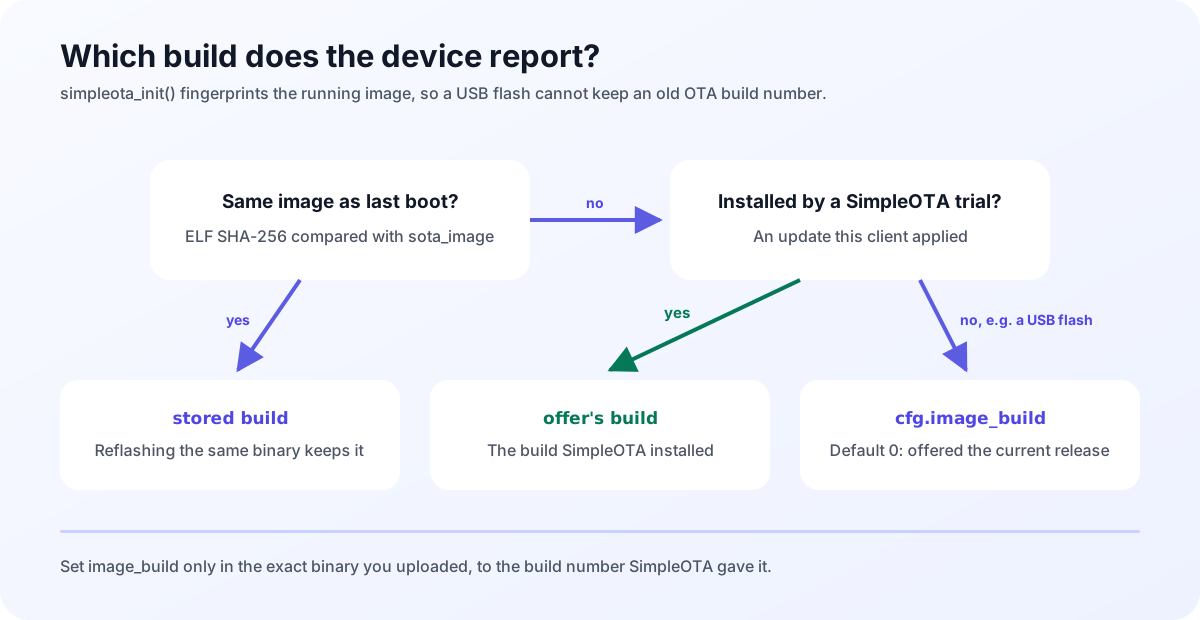 A USB-flashed image reports
 image_build, so the server offers it the current release.
So if you ever flash a release over USB, set cfg.image_build to the build
number SimpleOTA gave that exact binary when you uploaded it, before you call
simpleota_init(). On Arduino, start from an empty initializer and set each
field on its own line, which builds on every C++ version Arduino-ESP32 uses:
#include <simpleota.h>

simpleota_config_t cfg = {};
cfg.token = "YOUR_PROJECT_TOKEN";
cfg.image_build = 15;
simpleota_init(&cfg);
In an ESP-IDF C file you can name the fields instead:
#include "simpleota.h"

simpleota_config_t cfg = {
    .token = "YOUR_PROJECT_TOKEN",
    .image_build = 15,
};
simpleota_init(&cfg);
For how a successful OTA writes the offer’s build into NVS, see build numbers.
Where to go next
Whichever client you’re on, handle SIMPLEOTA_DOWNGRADE, then follow
Upgrading to 1.0.0 for
the rest, step by step.
New to SimpleOTA? Start with getting started and create an account. The Arduino guide takes a 1.0.0 sketch all the way from install to your first deployment. You’ll find the packages on PlatformIO and the Espressif Component Registry.